Understanding the software lifecycle
General overview
The process of delivering software requires multiple steps.
If the software is not a part of KDE, then it needs to undergo an Incubation process to be integrated into KDE infrastructure, and then pass KDE Review.
If the software is already using KDE infrastructure, then it can go straight to KDE Review.

If the release you plan to do is an alpha, beta or release candidate (RC), then it would use an unstable branch. If the release is stable, then it would use a stable branch. A branch, in this context, is a line of development, that is, where you would continue to develop your software.
Before passing KDE Review, a project is allowed to release their software in the unstable branch, but not in the stable branch. After passing review, the project can release under either branch.
In practice, this means that the tarballs will be stored in a stable/ or unstable/ folder under https://download.kde.org.
When preparing the project for release, you will need to make changes in code to reflect a specific version, update repo-metadata to point to the branches that will be used for tarballing, create the tarball containing the source code, branch (if you're planning to make point releases), tag it, and then move it to a place where downstreams (like Linux distributions) can access it.
The first step you must always do is to update repo-metadata to point to the branches you will be using for the release under projects-invent/yourproject/i18n.json.
Both stable releases and unstable releases can be tagged from the master branch. Tags are, in this context, just an immutable pointer or snapshot of a branch/revision used for releases that gets used by downstreams like Linux distributions.
In this case, the current master branch is used to create a tag such as v6.0.0. This process is simple and straightforward. Your only development target would then be the master branch.
In the case of unstable releases, tags typically use .70, .80 or .90 at the end of the versioning name for alpha, beta and release candidates, respectively. For example: v6.0.80. Some projects might use .80 for alpha and .90 for beta.
As an alternative to making stable releases based on the master branch, if you want to make point releases, that is, bugfix releases with tags such as v6.0.1 or v6.0.2, you may create a stable branch matching $MAJOR.$MINOR, such as 6.0 (alternatively: release/6.0). This process is more involved. This allows you to target both the master branch for the next major release, and the 6.0 branch.
After preparations for a stable release are done, you will have to perform a feature freeze on the desired branch (if making point releases, then 6.0, if not then master). Additionally, because your project will ship translations, you will have to perform a string freeze, that is, making no changes to any translatable strings. Make sure that the i18n.json file in repo-metadata points to the corrects branches. Send an email to the KDE i18n-doc mailing list kde-i18n-doc@kde.org notifying translators of the string freeze. This is to ensure that translators have some time to localize your software before release. If you do need a string changed, ask the translators for a string-freeze exception.
If the release is going to be unstable or you do not plan to make point releases, the string freeze (and all pertinent steps) may be performed on the master branch as well until the day of release.
Then, you create the tarball, which is simply an archive containing the source code matching the tag, used by downstreams to reproducibly build your software. To create the tarball, you will need to generate your own GPG key, which can be easily done with Kleopatra.
After creating the tarball, some testing is required before creating the tag and moving it to the right place.
The release process in practice
This can all be rather confusing, but let's take a look at what it looks like in sequential order depending on whether you want to make a stable or unstable release.
Suppose you plan to make multiple unstable releases that correspond to the beta (6.4.80) and release candidate (6.4.90) in preparation for making a future 6.5.0 release:
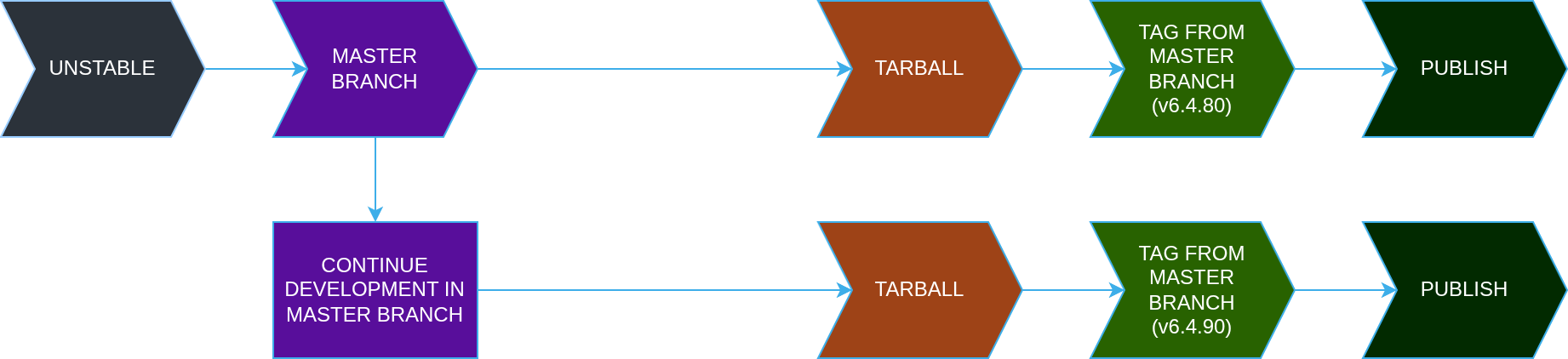
Now that you've gotten some unstable releases for your users to test, you want to make a stable 6.5.0 release and plan to create just one point release, namely 6.5.1. You don't need the complexity of a stable branch, so you can tag from master:

However, you realise that the next 6.6.0 release will require many point releases (here, just two for demonstrative purposes), and your project is seeing more feature development in the master branch. So, you want to keep developing on the master branch (thinking ahead in preparation for the 6.7 release) and have a separate, stable branch just for 6.6 point releases.
The whole process should look like this:
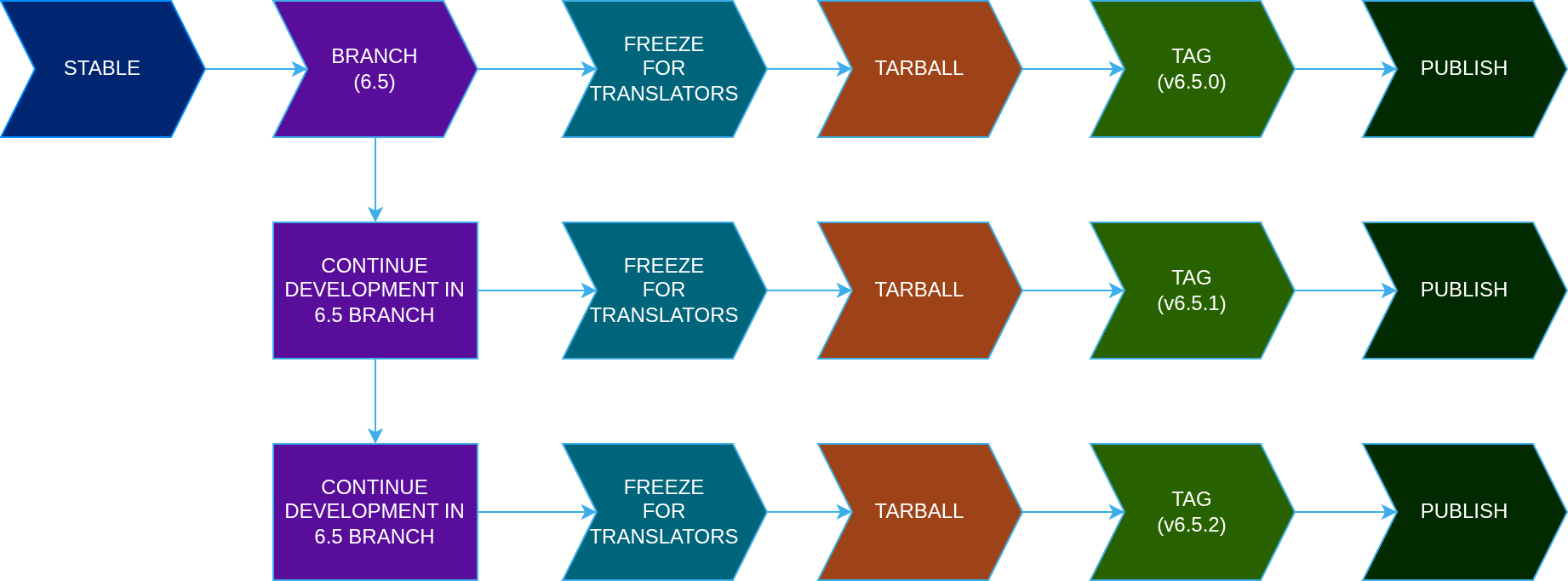
Because of this release workflow, you are now able to work on the master branch for the development of the next 6.7.0 release and continue shipping point releases for your users of the 6.6 branch.