الطباعة
تخطيط المحتوى الخاص بك
لأغراض توضيحية، يستخدم هذا الدليل بطاقة مجردة (AbstractCard) لجعل أمثلة النص أوضح. طريقة أفضل لتحقيق النتائج نفسها هي استخدام بطاقة نموذج إضافات كيريغامي.
العناوين
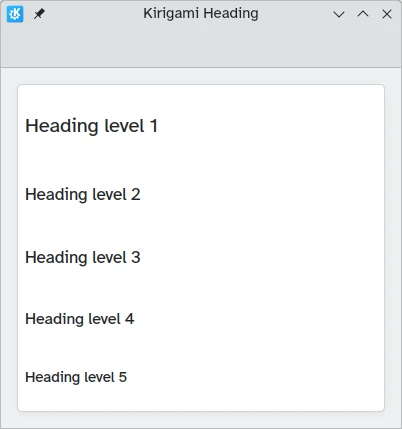
يوفر كيريغامي عنوانًا يمكن استخدامه لعناوين الصفحات أو الأقسام.
import QtQuick
import QtQuick.Layouts
import org.kde.kirigami as Kirigami

Kirigami.ApplicationWindow {
    title: "Kirigami Heading"
    height: 400
    width: 400

    pageStack.initialPage: Kirigami.Page {
        Kirigami.AbstractCard {
            anchors.fill: parent
            contentItem: ColumnLayout {
                anchors.fill: parent
                Kirigami.Heading {
                    text: "Heading level 1"
                    level: 1
                }
                Kirigami.Heading {
                    text: "Heading level 2"
                    level: 2
                }
                Kirigami.Heading {
                    text: "Heading level 3"
                    level: 3
                }
                Kirigami.Heading {
                    text: "Heading level 4"
                    level: 4
                }
                Kirigami.Heading {
                    text: "Heading level 5"
                    level: 5
                }
            }
        }
    }
}
اللصائق
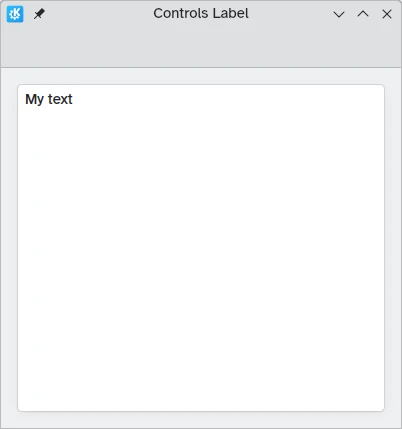
يجب أن تستخدم عناصر النص مكون اللصيقة من أدوات كيوت السريعة 2.
import QtQuick
import QtQuick.Controls as Controls
import org.kde.kirigami as Kirigami

Kirigami.ApplicationWindow {
    title: "Controls Label"
    height: 400
    width: 400

    pageStack.initialPage: Kirigami.Page {
        Kirigami.AbstractCard {
            anchors.fill: parent
            contentItem: Controls.Label {
                    text: "My text"
            }
        }
    }
}
محاذاة النص
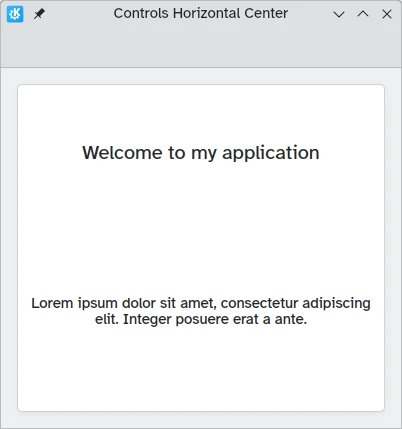
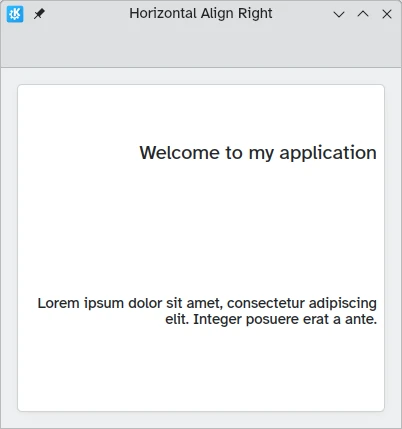
يمكنك محاذاة عناصر النص باستخدام الخاصيتين horizontalAlignment و verticalAlignment.
import QtQuick
import QtQuick.Layouts
import QtQuick.Controls as Controls
import org.kde.kirigami as Kirigami

Kirigami.ApplicationWindow {
    title: "Controls Horizontal Center"
    height: 400
    width: 400

    pageStack.initialPage: Kirigami.Page {
        Kirigami.AbstractCard {
            anchors.fill: parent
            contentItem: ColumnLayout {
                Kirigami.Heading {
                    Layout.fillWidth: true
                    horizontalAlignment: Text.AlignHCenter
                    text: "Welcome to my application"
                    wrapMode: Text.Wrap
                }
                Controls.Label {
                    Layout.fillWidth: true
                    horizontalAlignment: Text.AlignHCenter
                    text: "Lorem ipsum dolor sit amet, consectetur adipiscing elit. Integer posuere erat a ante."
                    wrapMode: Text.Wrap
                }
            }
        }
    }
}
import QtQuick
import QtQuick.Layouts
import QtQuick.Controls as Controls
import org.kde.kirigami as Kirigami

Kirigami.ApplicationWindow {
    title: "Horizontal Align Right"
    height: 400
    width: 400

    pageStack.initialPage: Kirigami.Page {
        Kirigami.AbstractCard {
            anchors.fill: parent
            contentItem: ColumnLayout {
                Kirigami.Heading {
                    Layout.fillWidth: true
                    horizontalAlignment: Text.AlignRight
                    text: "Welcome to my application"
                    wrapMode: Text.Wrap
                }
                Controls.Label {
                    Layout.fillWidth: true
                    horizontalAlignment: Text.AlignRight
                    text: "Lorem ipsum dolor sit amet, consectetur adipiscing elit. Integer posuere erat a ante."
                    wrapMode: Text.Wrap
                }
            }
        }
    }
}
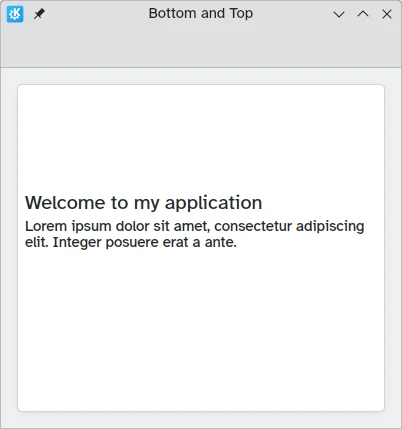
import QtQuick
import QtQuick.Layouts
import QtQuick.Controls as Controls
import org.kde.kirigami as Kirigami

Kirigami.ApplicationWindow {
    title: "Bottom and Top"
    height: 400
    width: 400

    pageStack.initialPage: Kirigami.Page {
        Kirigami.AbstractCard {
            anchors.fill: parent
            contentItem: ColumnLayout {
                Kirigami.Heading {
                    Layout.fillWidth: true
                    Layout.fillHeight: true
                    verticalAlignment: Text.AlignBottom
                    text: "Welcome to my application"
                    wrapMode: Text.WordWrap
                }
                Controls.Label {
                    Layout.fillWidth: true
                    Layout.fillHeight: true
                    verticalAlignment: Text.AlignTop
                    text: "Lorem ipsum dolor sit amet, consectetur adipiscing elit. Integer posuere erat a ante."
                    wrapMode: Text.WordWrap
                }
            }
        }
    }
}
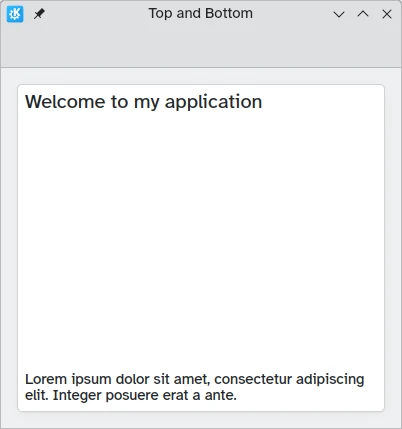
import QtQuick
import QtQuick.Layouts
import QtQuick.Controls as Controls
import org.kde.kirigami as Kirigami

Kirigami.ApplicationWindow {
    title: "Top and Bottom"
    height: 400
    width: 400

    pageStack.initialPage: Kirigami.Page {
        Kirigami.AbstractCard {
            anchors.fill: parent
            contentItem: ColumnLayout {
                Kirigami.Heading {
                    Layout.fillWidth: true
                    Layout.fillHeight: true
                    verticalAlignment: Text.AlignTop
                    text: "Welcome to my application"
                    wrapMode: Text.WordWrap
                }
                Controls.Label {
                    Layout.fillWidth: true
                    Layout.fillHeight: true
                    verticalAlignment: Text.AlignBottom
                    text: "Lorem ipsum dolor sit amet, consectetur adipiscing elit. Integer posuere erat a ante."
                    wrapMode: Text.WordWrap
                }
            }
        }
    }
}
نص منسق
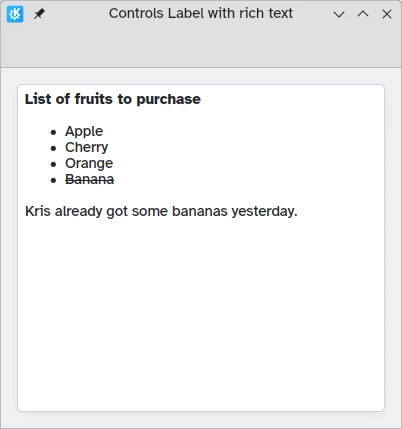
تسمح لك كيوإمإل بعرض (وتحرير) النص المنسق. يمكن التحكم في السلوك عبر الخاصية textFormat.
import QtQuick
import QtQuick.Layouts
import QtQuick.Controls as Controls
import org.kde.kirigami as Kirigami

Kirigami.ApplicationWindow {
    title: "Controls Label with rich text"
    height: 400
    width: 400

    pageStack.initialPage: Kirigami.Page {
        Kirigami.AbstractCard {
            anchors.fill: parent
            contentItem: Controls.Label {
                text: "<p><strong>List of fruits to purchase</strong></p>
                <ul>
                <li>Apple</li>
                <li>Cherry</li>
                <li>Orange</li>
                <li><del>Banana</del></li>
                </ul>
                <p>Kris already got some bananas yesterday.</p>"
            }
        }
    }
}
السمة
حجم خط سمة كيريغامي متاح كـ Kirigami.Theme.defaultFont.pointSize في تطبيقك.