تخط المحتوى

اربط نماذج C++ بواجهة مستخدم QML الخاصة بك

البيانات من الواجهة الخلفية C++ إلى الواجهة الأمامية QML

كما هو موضح في الدرس السابق، يمكنك وصل كود C++ بـ QML بإنشاء صف سيُعامل كمكون آخر في QML. لكن قد ترغب في تمثيل بيانات أكثر تعقيدًا، مثل بيانات تحتاج إلى العمل كنموذج قائمة ListModel مخصص أو تحتاج بطريقة ما إلى التفويض من Repeater.

يمكننا إنشاء نماذج خاصة بنا من جانب C++، وتصريح كيف ينبغي تمثيل البيانات من ذلك النموذج على الواجهة الأمامية لـ QML.

يُوصى بشدة بقراءة البرنامج التعليمي طرق عرض القوائم قبل هذا البرنامج.

سيعتمد الكود المستخدم في هذا البرنامج التعليمي على الصفحة السابقة، اربط المنطق بواجهة مستخدم QML الخاصة بك.

هيكل المشروع

kirigami-tutorial/
├── CMakeLists.txt --------------------- # Modified for didactic purposes
├── org.kde.tutorial.desktop
└── src/
    ├── CMakeLists.txt
    ├── main.cpp
    ├── Main.qml ----------------------- # Modified
    └── components/
        ├── CMakeLists.txt ------------- # Modified
        ├── AddDialog.qml
        ├── KountdownDelegate.qml
        ├── ExposePage.qml
        ├── ModelsPage.qml ------------- # New
        ├── model.h -------------------- # New
        ├── model.cpp ------------------ # New
        ├── backend.h
        └── backend.cpp

إنشاء صفحة جديدة للبرنامج التعليمي للنماذج

قبل فعل أي شيء، لنُضِف صفحة جديدة إلى كود QML الخاص بنا.

أولاً، في src/Main.qml، أضِف الإجراء التالي إلى الدرج العام:

15
16
17
18
19
20
21
22
23
24
25
26
27
28
29
30
31
32
33
34
35
    globalDrawer: Kirigami.GlobalDrawer {
        isMenu: true
        actions: [
            Kirigami.Action {
                text: i18n("Exposing to QML")
                icon.name: "kde"
                onTriggered: pageStack.push(Qt.createComponent("org.kde.tutorial.components", "ExposePage"))
            },
            Kirigami.Action {
                text: i18n("C++ models in QML")
                icon.name: "kde"
                onTriggered: pageStack.push(Qt.createComponent("org.kde.tutorial.components", "ModelsPage"))
            },
            Kirigami.Action {
                text: i18n("Quit")
                icon.name: "application-exit-symbolic"
                shortcut: StandardKey.Quit
                onTriggered: Qt.quit()
            }
        ]
    }

ثم، أنشِئ ملفًا جديدًا src/components/ModelsPage.qml بالمحتويات التالية:

1
2
3
4
5
6
7
8
9
import QtQuick
import QtQuick.Layouts
import QtQuick.Controls as Controls
import org.kde.kirigami as Kirigami

Kirigami.ScrollablePage {
    title: "C++ models in QML"
    // ...
}

وأخيرًا، أضِفه إلى src/components/CMakeLists.txt:

 1
 2
 3
 4
 5
 6
 7
 8
 9
10
11
12
13
14
15
16
17
18
19
20
21
22
23
add_library(kirigami-hello-components)

ecm_add_qml_module(kirigami-hello-components
    URI "org.kde.tutorial.components"
    GENERATE_PLUGIN_SOURCE
)

ecm_target_qml_sources(kirigami-hello-components
    SOURCES
    AddDialog.qml
    KountdownDelegate.qml
    ExposePage.qml
    ModelsPage.qml
)

target_sources(kirigami-hello-components
    PRIVATE
    backend.cpp backend.h
)

ecm_finalize_qml_module(kirigami-hello-components)

install(TARGETS kirigami-hello-components ${KDE_INSTALL_TARGETS_DEFAULT_ARGS})

سيكون هذا بمثابة اللوحة لصفحة هذا البرنامج التعليمي.

استخدام السلاسل النصية الخام

لتسهيل فهم كيفية تعبئة النموذج في هذا البرنامج التعليمي، سنعطل ميزة تستخدمها تطبيقات كيدي التي تستخدم وحدات cmake الإضافية (ECM) افتراضيًا والتي تحسّن كود السلاسل النصية. يتيح لنا هذا تجنب كتابة QStringLiteral() في كل مرة تُقدَّم فيها سلسلة نصية في كود C++ الخاص بنا، وهو ما سيكون مفيدًا للكود في ملف الرأس القادم.

في ملف CMakeLists.txt الجذر، أضِف ما يلي:

 1
 2
 3
 4
 5
 6
 7
 8
 9
10
11
12
13
14
15
16
17
18
19
20
21
22
23
24
25
26
27
28
29
30
31
32
33
34
35
36
37
cmake_minimum_required(VERSION 3.20)
project(kirigami-tutorial)

find_package(ECM 6.0.0 REQUIRED NO_MODULE)
set(CMAKE_MODULE_PATH ${ECM_MODULE_PATH})

include(KDEInstallDirs)
include(KDECMakeSettings)
include(KDECompilerSettings NO_POLICY_SCOPE)
include(ECMFindQmlModule)
include(ECMQmlModule)
remove_definitions(-DQT_NO_CAST_FROM_ASCII)

find_package(Qt6 REQUIRED COMPONENTS
    Core
    Quick
    Test
    Gui
    QuickControls2
    Widgets
)

find_package(KF6 REQUIRED COMPONENTS
    Kirigami
    I18n
    CoreAddons
    QQC2DesktopStyle
    IconThemes
)

ecm_find_qmlmodule(org.kde.kirigami REQUIRED)

add_subdirectory(src)

install(PROGRAMS org.kde.tutorial.desktop DESTINATION ${KDE_INSTALL_APPDIR})

feature_summary(WHAT ALL INCLUDE_QUIET_PACKAGES FATAL_ON_MISSING_REQUIRED_PACKAGES)

تحضير الصنف

سننشئ صنفًا يحتوي على QMap، حيث يُستخدم QString كمفتاح وكائنات QStringList كقيم. ستتمكن الواجهة الأمامية من قراءة وعرض المفاتيح والقيم وستكون بسيطة الاستخدام تمامًا مثل مصفوفة أحادية البعد. يجب أن تبدو مشابهة لـ QML ListModel.

لفعل هذا، نحتاج إلى إنشاء صنف يرث من QAbstractListModel. لنُضِف أيضًا بعض البيانات إلى QMap. ستكون هذه التصريحات موجودة في model.h.

أنشِئ ملفين جديدين، src/components/model.h و src/components/model.cpp.

أضِف هذين الملفين الجديدين إلى src/components/CMakeLists.txt:

 1
 2
 3
 4
 5
 6
 7
 8
 9
10
11
12
13
14
15
16
17
18
19
20
21
22
23
24
add_library(kirigami-hello-components)

ecm_add_qml_module(kirigami-hello-components
    URI "org.kde.tutorial.components"
    GENERATE_PLUGIN_SOURCE
)

ecm_target_qml_sources(kirigami-hello-components
    SOURCES
    AddDialog.qml
    KountdownDelegate.qml
    ExposePage.qml
    ModelsPage.qml
)

target_sources(kirigami-hello-components
    PRIVATE
    backend.cpp backend.h
    model.cpp model.h
)

ecm_finalize_qml_module(kirigami-hello-components)

install(TARGETS kirigami-hello-components ${KDE_INSTALL_TARGETS_DEFAULT_ARGS})

أضِف ما يلي كمحتويات أولية إلى src/components/model.h:

 1
 2
 3
 4
 5
 6
 7
 8
 9
10
11
12
13
14
15
16
17
#pragma once

#include <QAbstractListModel>
#include <qqmlintegration.h>

class Model : public QAbstractListModel {
    Q_OBJECT
    QML_ELEMENT
public:

private:
    QMap<QString, QStringList> m_list = {
            {"Feline", {"Tigress",   "Waai Fuu"}},
            {"Fox",    {"Carmelita", "Diane", "Krystal"}},
            {"Goat",   {"Sybil",     "Toriel"}}
    };
};

بالطبع، لا يمكننا عرض هذا الصنف كما هو. نحتاج أيضًا إلى إخبار QML بكيفية تمثيل هذه البيانات في الصنف. يمكننا فعل ذلك بتجاوز ثلاث دوال افتراضية أساسية:

  • rowCount() - اعتبر هذه الدالة وسيلة لإخبار QML بعدد العناصر التي يجب أن يعرضها النموذج.
  • roleNames() - يمكنك اعتبار أسماء الأدوار كأسماء خصائص مرفقة بالبيانات في QML. تسمح لك هذه الدالة بإنشاء تلك الأدوار.
  • data() - تُستدعى هذه الدالة عندما تريد استرداد البيانات التي تتوافق مع أسماء الأدوار من النموذج.

تجاوز وتنفيذ rowCount()

لنتجاوز الدالة في ملف الرأس src/components/model.h. تأتي دالة rowCount() مع معاملها الخاص، لكنه لن يُستخدم في هذا المثال ولذا لا يحتاج إلى تسمية.

 1
 2
 3
 4
 5
 6
 7
 8
 9
10
11
12
13
14
15
16
17
18
#pragma once

#include <QAbstractListModel>
#include <qqmlintegration.h>

class Model : public QAbstractListModel {
    Q_OBJECT
    QML_ELEMENT
public:
    int rowCount(const QModelIndex &) const override;

private:
    QMap<QString, QStringList> m_list = {
            {"Feline", {"Tigress",   "Waai Fuu"}},
            {"Fox",    {"Carmelita", "Diane", "Krystal"}},
            {"Goat",   {"Sybil",     "Toriel"}}
    };
};

ثم، لنُصرِّح بعدد الصفوف في هذا النموذج في src/components/model.cpp:

1
2
3
4
5
#include "model.h"

int Model::rowCount(const QModelIndex &) const {
    return m_list.count();
}

تجاوز وتنفيذ roleNames()

قبل أن نتجاوز roleNames()، نحتاج إلى تصريح ما هي الأدوار في جانب C++ باستخدام تعداد عام. السبب في ذلك هو أن قيم التعداد هذه تُمرر إلى data() في كل مرة يصل فيها QML إلى دور مقابل، وبالتالي يمكننا جعل data() تُرجع ما نريد.

لنبدأ بإنشاء التعداد للأدوار في src/components/model.h، حيث كل قيمة هي دور لجانب C++.

 1
 2
 3
 4
 5
 6
 7
 8
 9
10
11
12
13
14
15
16
17
18
19
20
21
22
23
24
#pragma once

#include <QAbstractListModel>
#include <qqmlintegration.h>

class Model : public QAbstractListModel {
    Q_OBJECT
    QML_ELEMENT
public:
    enum Roles {
        SpeciesRole = Qt::UserRole,
        CharactersRole
    };

    QHash<int, QByteArray> roleNames() const override;
    int rowCount(const QModelIndex &) const override;

private:
    QMap<QString, QStringList> m_list = {
            {"Feline", {"Tigress",   "Waai Fuu"}},
            {"Fox",    {"Carmelita", "Diane", "Krystal"}},
            {"Goat",   {"Sybil",     "Toriel"}}
    };
};

بمجرد أن نستقر على ذلك، يمكننا أخيرًا إنشاء ما هي هذه الأدوار في جانب QML باستخدام QHash حيث المفاتيح هي القيم المعدودة مقترنة بـ QByteArrays. يجب أن يذهب هذا إلى src/components/model.cpp. النص في QByteArray هو ما يُستخدم في كود QML الفعلي.

 1
 2
 3
 4
 5
 6
 7
 8
 9
10
11
12
#include "model.h"

int Model::rowCount(const QModelIndex &) const {
    return m_list.count();
}

QHash<int, QByteArray> Model::roleNames() const {
    return {
        {SpeciesRole,   "species"},
        {CharactersRole, "characters"}
    };
}

في نموذجنا المثال، يمكن استخدام الدور "species" لاسترداد مفتاح QString "Feline"، "Fox"، "Goat"، كل في مفوض منفصل. يمكن فعل الشيء نفسه مع قيم QStringList لقائمة أسماء الشخصيات.

تجاوز وتنفيذ data()

هناك معلمتان تُمرران إلى data(): index و role. index هو موضع البيانات في النموذج. كما ذُكر سابقًا، يُستخدم role بواسطة QML للحصول على بيانات محددة تُعاد عند الوصول إلى دور.

في data()، يمكننا استخدام جملة switch لإرجاع البيانات ونوع البيانات المناسبين اعتمادًا على الدور، وهذا ممكن لأن data() تُرجع QVariant. ما زلنا بحاجة للتأكد من الحصول على الموقع المناسب للبيانات. في هذا المثال أدناه، يمكنك رؤية أن متغير مكرر جديد يُصرح عنه، ويُضبط من بداية القائمة زائد صف الفهرس، والبيانات التي يشير إليها المكرر هي ما يُعاد.

لا يمكننا فقط إرجاع أي بيانات نريدها. قد نحاول ربط بيانات بخاصية بنوع بيانات غير متوافق، مثل QStringList إلى QString. قد تضطر لإجراء تحويل بيانات لكي تُعرض البيانات بشكل صحيح. لهذا، ننشئ دالة خاصة ثابتة جديدة باسم formatList().

ينتج عن هذا الكود التالي في src/components/model.cpp:

 1
 2
 3
 4
 5
 6
 7
 8
 9
10
11
12
13
14
15
16
17
18
19
20
21
22
23
24
25
26
27
28
29
30
31
32
33
34
35
#include "model.h"

int Model::rowCount(const QModelIndex &) const {
    return m_list.count();
}

QHash<int, QByteArray> Model::roleNames() const {
    return {
        {SpeciesRole,   "species"},
        {CharactersRole, "characters"}
    };
}

QVariant Model::data(const QModelIndex &index, int role) const {
    const auto it = std::next(m_list.begin(), index.row());
    switch (role) {
        case SpeciesRole:
            return it.key();
        case CharactersRole:
            return formatList(it.value());
        default:
            return {};
    }
}

QString Model::formatList(const QStringList& list) {
    QString result;
    for (const QString& character : list) {
        result += character;
        if (list.last() != character) {
            result += ", ";
        }
    }
    return result;
}

والكود التالي في src/components/model.h:

 1
 2
 3
 4
 5
 6
 7
 8
 9
10
11
12
13
14
15
16
17
18
19
20
21
22
23
24
25
#pragma once

#include <QAbstractListModel>
#include <qqmlintegration.h>

class Model : public QAbstractListModel {
    Q_OBJECT
    QML_ELEMENT
public:
    enum Roles {
        SpeciesRole = Qt::UserRole,
        CharactersRole
    };
    int rowCount(const QModelIndex &) const override;
    QHash<int, QByteArray> roleNames() const override;
    QVariant data(const QModelIndex &index, int role) const override;

private:
    QMap<QString, QStringList> m_list = {
        {"Feline", {"Tigress",   "Waai Fuu"}},
        {"Fox",    {"Carmelita", "Diane", "Krystal"}},
        {"Goat",   {"Sybil",     "Toriel"}}
    };
    static QString formatList(const QStringList& list);
};

استخدام الصنف في QML

ملف QML المستخدم سيحتوي فقط على ثلاثة مكونات Kirigami.AbstractCard، حيث المفتاح هو الرأس والقيمة هي المحتوى. تُنشأ هذه البطاقات بتفويض AbstractCard باستخدام Repeater، حيث يعمل النموذج المخصص الذي أنشأناه كنموذج. تُوصل البيانات باستخدام كلمة model، متبوعة بالأدوار التي أعلناها في roleNames().

 1
 2
 3
 4
 5
 6
 7
 8
 9
10
11
12
13
14
15
16
17
18
19
20
21
22
23
24
25
26
27
import QtQuick
import QtQuick.Layouts
import QtQuick.Controls as Controls
import org.kde.kirigami as Kirigami

Kirigami.ScrollablePage {
    title: "C++ models in QML"
    Model {
        id: customModel
    }
    ColumnLayout {
        anchors.left: parent.left
        anchors.right: parent.right
        Repeater {
            model: customModel
            delegate: Kirigami.AbstractCard {
                header: Kirigami.Heading {
                    text: model.species
                    level: 2
                }
                contentItem: Controls.Label {
                    text: model.characters
                }
            }
        }
    }
}
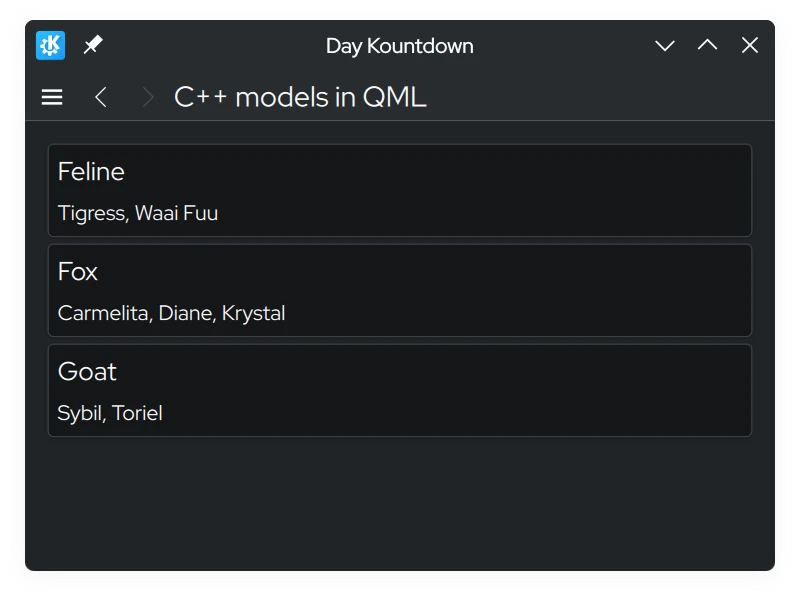
لقطة شاشة لنماذج C++ في صفحة QML تُظهر قائمة شخصيات منظمة حسب النوع

تعديل البيانات

تحرير البيانات باستخدام dataChanged() و setData()

قد تواجه موقفًا تريد فيه تعديل البيانات في النموذج، وأن تنعكس التغييرات على جانب الواجهة الأمامية. كل مرة نغير فيها البيانات في النموذج، يجب أن نُصدر إشارة dataChanged() التي ستطبق تلك التغييرات على جانب الواجهة الأمامية في الخلايا المحددة في وسائطها. في هذا الدليل، يمكننا فقط استخدام وسيطة index لـ setData().

setData() هي دالة افتراضية يمكنك تجاوزها بحيث أن تعديل البيانات من جانب الواجهة الأمامية يعكس تلقائيًا تلك التغييرات على جانب الخلفية. تتطلب ثلاث معاملات:

  • index - موقع البيانات.
  • value - محتويات البيانات الجديدة.
  • role - في هذا السياق، يُستخدم الدور هنا لإخبار العروض كيف يجب أن تتعامل مع البيانات. يجب أن يكون الدور هنا Qt::EditRole.

معامل role في هذه الحالة يُستخدم لضمان أن setData() يمكن تحريرها عبر إدخال المستخدم (Qt::EditRole). باستخدام index، يمكننا استخدام ذلك لتحديد موقع حيث يجب تحرير البيانات بمحتويات value.

 1
 2
 3
 4
 5
 6
 7
 8
 9
10
11
12
13
14
15
16
17
18
19
20
21
22
23
24
25
26
27
28
29
30
31
32
33
34
35
36
37
38
39
40
41
42
43
44
45
46
47
48
49
50
#include "model.h"

int Model::rowCount(const QModelIndex &) const {
    return m_list.count();
}

QHash<int, QByteArray> Model::roleNames() const {
    return {
        {SpeciesRole,   "species"},
        {CharactersRole, "characters"}
    };
}

QVariant Model::data(const QModelIndex &index, int role) const {
    const auto it = std::next(m_list.begin(), index.row());
    switch (role) {
        case SpeciesRole:
            return it.key();
        case CharactersRole:
            return formatList(it.value());
        default:
            return {};
    }
}

QString Model::formatList(const QStringList& list) {
    QString result;
    for (const QString& character : list) {
        result += character;
        if (list.last() != character) {
            result += ", ";
        }
    }
    return result;
}

bool Model::setData(const QModelIndex &index, const QVariant &value, int role) {
    if (!value.canConvert<QString>() && role != Qt::EditRole) {
        return false;
    }

    auto it = std::next(m_list.begin(), index.row());
    QString charactersUnformatted = value.toString();
    QStringList characters = charactersUnformatted.split(", ");

    m_list[it.key()] = characters;
    Q_EMIT dataChanged(index, index);

    return true;
}

مع الإضافة المقابلة في src/components/model.h:

 1
 2
 3
 4
 5
 6
 7
 8
 9
10
11
12
13
14
15
16
17
18
19
20
21
22
23
24
25
#pragma once

#include <QAbstractListModel>
#include <qqmlintegration.h>

class Model : public QAbstractListModel {
    Q_OBJECT
    QML_ELEMENT
public:
    enum Roles {
        SpeciesRole = Qt::UserRole,
        CharactersRole
    };
    int rowCount(const QModelIndex &) const override;
    QHash<int, QByteArray> roleNames() const override;
    QVariant data(const QModelIndex &index, int role) const override;
    bool setData(const QModelIndex &index, const QVariant &value, int role) override;
private:
    QMap<QString, QStringList> m_list = {
        {"Feline", {"Tigress",   "Waai Fuu"}},
        {"Fox",    {"Carmelita", "Diane", "Krystal"}},
        {"Goat",   {"Sybil",     "Toriel"}}
    };
    static QString formatList(const QStringList& list);
};

لنحدث كود QML بحيث يمكننا فتح موجه يسمح لنا بتحرير النموذج باستخدام Controls.Button ملحق بالبطاقات.

أضف التالي Kirigami.PromptDialog إلى src/components/ModelsPage.qml، مع زر تحرير جديد:

 1
 2
 3
 4
 5
 6
 7
 8
 9
10
11
12
13
14
15
16
17
18
19
20
21
22
23
24
25
26
27
28
29
30
31
32
33
34
35
36
37
38
39
40
41
42
43
44
45
46
47
48
49
50
51
52
53
54
55
56
57
58
59
60
import QtQuick
import QtQuick.Layouts
import QtQuick.Controls as Controls
import org.kde.kirigami as Kirigami
import org.kde.tutorial.components

Kirigami.ScrollablePage {
    title: "C++ models in QML"
    Model {
        id: customModel
    }
    ColumnLayout {
        anchors.left: parent.left
        anchors.right: parent.right
        Repeater {
            model: customModel
            delegate: Kirigami.AbstractCard {
                Layout.fillHeight: true
                header: Kirigami.Heading {
                    text: model.species
                    level: 2
                }
                contentItem: Item {
                    implicitWidth: delegateLayout.implicitWidth
                    implicitHeight: delegateLayout.implicitHeight
                    ColumnLayout {
                        id: delegateLayout
                        Controls.Label {
                            text: model.characters
                        }
                        Controls.Button {
                            text: "Edit"
                            onClicked: {
                                editPrompt.text = model.characters;
                                editPrompt.model = model;
                                editPrompt.open();
                            }
                        }
                    }
                }
            }
        }
    }
    Kirigami.PromptDialog {
        id: editPrompt
        property var model
        property alias text: editPromptText.text
        title: "Edit Characters"
        standardButtons: Kirigami.Dialog.Ok | Kirigami.Dialog.Cancel
        onAccepted: {
            const model = editPrompt.model;
            model.characters = editPromptText.text;
            editPrompt.close();
        }
        Controls.TextField {
            id: editPromptText
            onAccepted: editPrompt.accept()
        }
    }
}

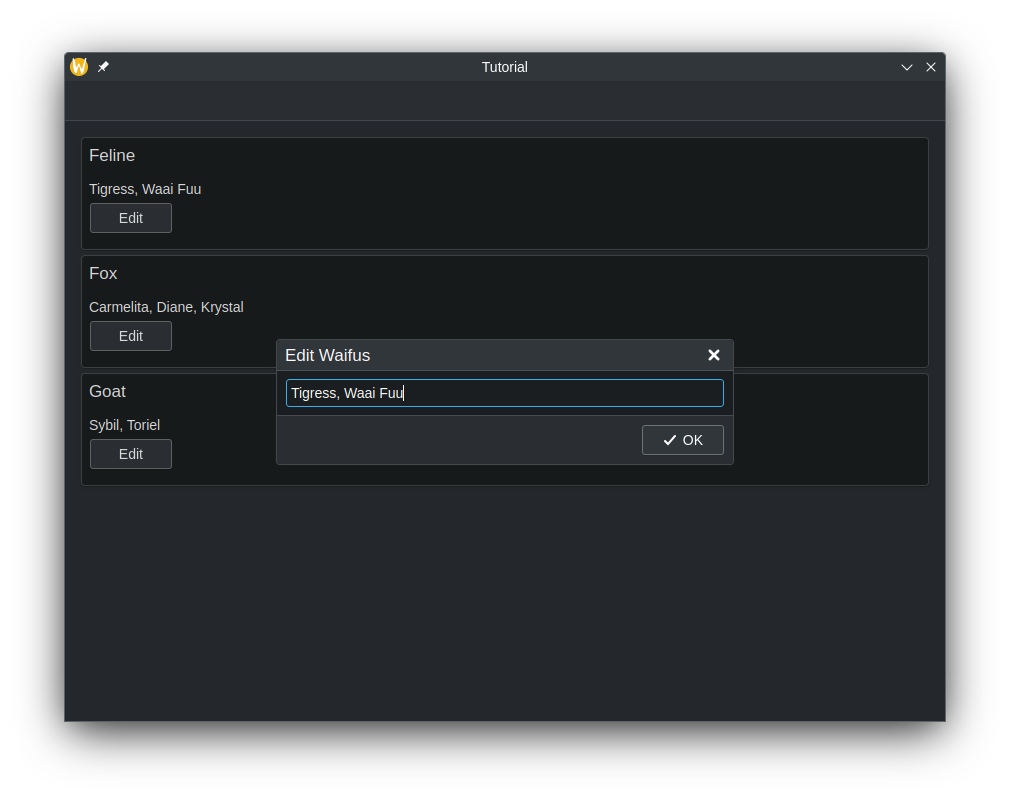
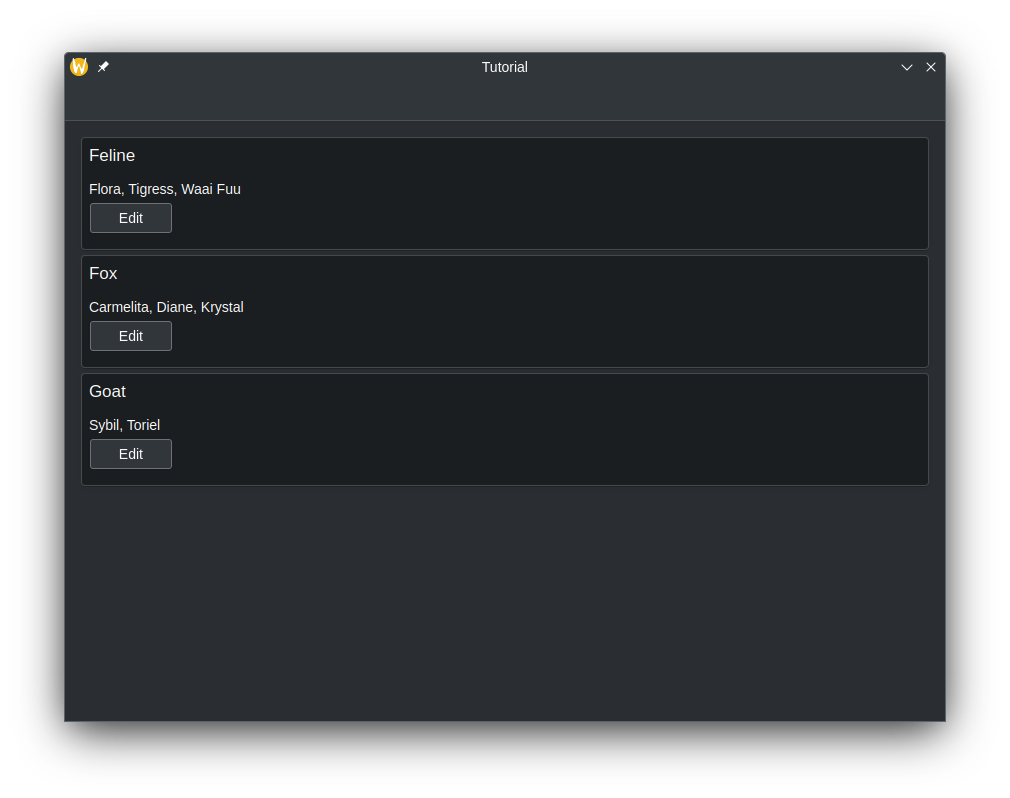
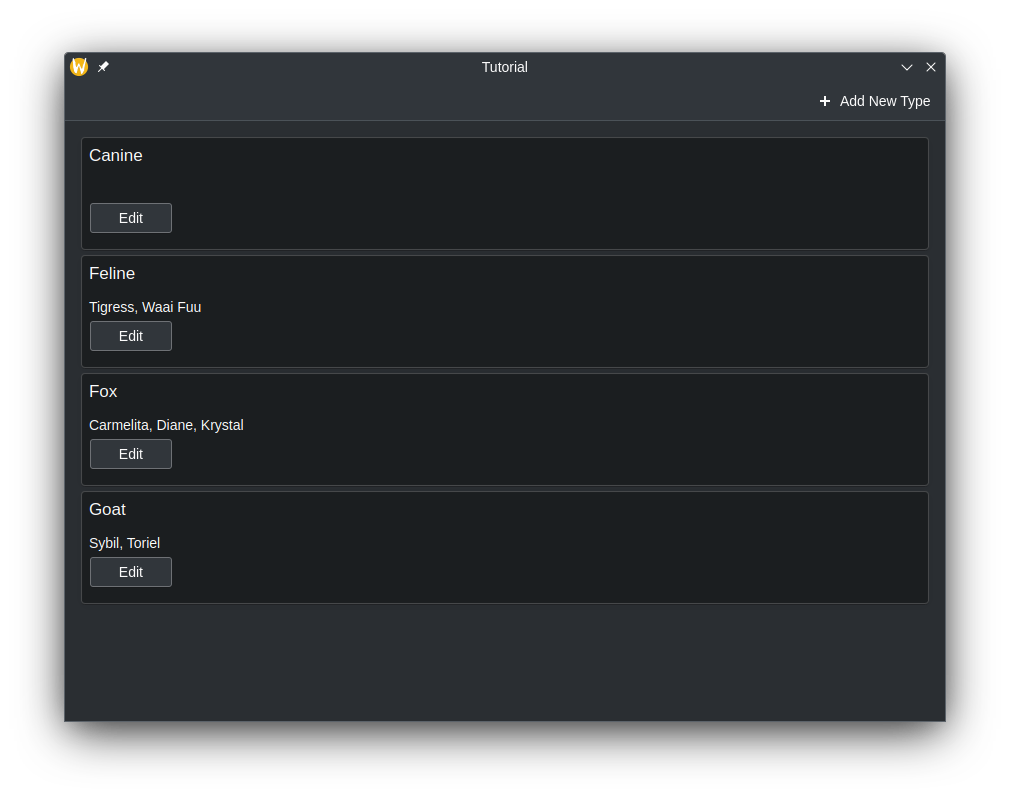
الآن، كلما تغيرت قيم النموذج في الواجهة الأمامية، يجب أن تُحدث التغييرات تلقائيًا في الخلفية.

app_screenshot_1.png
app_screenshot_2.png

إضافة صفوف

أضفنا طريقة لتعديل البيانات في المفاتيح الموجودة لـ QMap، وفي الواجهة الأمامية، ينعكس هذا كتعديل المحتويات داخل AbstractCards. لكن ماذا لو احتجنا لإضافة إدخال مفتاح جديد في QMap وجعل ذلك ينعكس على جانب QML؟ لنفعل هذا بإنشاء طريقة جديدة قابلة للاستدعاء على جانب QML لأداء هذه المهمة.

لجعل الطريقة مرئية في QML، يجب أن نبدأ تعريف الطريقة بماكرو Q_INVOKABLE. ستتضمن هذه الطريقة أيضًا معامل سلسلة نصية، والذي يُقصد به أن يكون المفتاح الجديد في QMap.

 1
 2
 3
 4
 5
 6
 7
 8
 9
10
11
12
13
14
15
16
17
18
19
20
21
22
23
24
25
26
#pragma once

#include <QAbstractListModel>
#include <qqmlintegration.h>

class Model : public QAbstractListModel {
    Q_OBJECT
    QML_ELEMENT
public:
    enum Roles {
        SpeciesRole = Qt::UserRole,
        CharactersRole
    };
    int rowCount(const QModelIndex &) const override;
    QHash<int, QByteArray> roleNames() const override;
    QVariant data(const QModelIndex &index, int role) const override;
    Q_INVOKABLE void addSpecies(const QString &species);

private:
    QMap<QString, QStringList> m_list = {
        {"Feline", {"Tigress",   "Waai Fuu"}},
        {"Fox",    {"Carmelita", "Diane", "Krystal"}},
        {"Goat",   {"Sybil",     "Toriel"}}
    };
    static QString formatList(const QStringList& list);
};

داخل هذه الطريقة، نحتاج إلى إخبار كيوت بأننا نريد إنشاء المزيد من الصفوف في النموذج. يُفعل ذلك باستدعاء beginInsertRows() لبدء عملية إضافة الصفوف، يليه إدراج ما نحتاجه، ثم استخدام endInsertRows() لإنهاء العملية. ومع ذلك، لا يزال يتعين علينا إصدار dataChanged() في النهاية. هذه المرة، سنقوم بتحديث جميع الصفوف، من الصف الأول إلى الأخير، لأن QMap قد يعيد تنظيم نفسه أبجديًا، ونحتاج إلى التقاط ذلك عبر جميع الصفوف.

عند استدعاء beginInsertRows()، نحتاج أولاً إلى تمرير فئة QModelIndex لتحديد موقع إضافة الصفوف الجديدة، يليه ما سيكون عليه رقما الصف الأول والأخير الجديدان. في هذا الدليل، ستكون الوسيطة الأولى مجرد QModelIndex() حيث لا حاجة لاستخدام المعامل هنا. يمكننا فقط استخدام حجم الصف الحالي لرقمي الصف الأول والأخير، لأننا سنضيف صفًا واحدًا فقط في نهاية النموذج.

 1
 2
 3
 4
 5
 6
 7
 8
 9
10
11
12
13
14
15
16
17
18
19
20
21
22
23
24
25
26
27
28
29
30
31
32
33
34
35
36
37
38
39
40
41
42
43
44
45
46
47
48
49
50
51
52
53
54
55
56
57
#include "model.h"

int Model::rowCount(const QModelIndex &) const {
    return m_list.count();
}

QHash<int, QByteArray> Model::roleNames() const {
    return {
        {SpeciesRole,   "species"},
        {CharactersRole, "characters"}
    };
}

QVariant Model::data(const QModelIndex &index, int role) const {
    const auto it = std::next(m_list.begin(), index.row());
    switch (role) {
        case SpeciesRole:
            return it.key();
        case CharactersRole:
            return formatList(it.value());
        default:
            return {};
    }
}

QString Model::formatList(const QStringList& list) {
    QString result;
    for (const QString& character : list) {
        result += character;
        if (list.last() != character) {
            result += ", ";
        }
    }
    return result;
}

bool Model::setData(const QModelIndex &index, const QVariant &value, int role) {
    if (!value.canConvert<QString>() && role != Qt::EditRole) {
        return false;
    }

    auto it = std::next(m_list.begin(), index.row());
    QString charactersUnformatted = value.toString();
    QStringList characters = charactersUnformatted.split(", ");

    m_list[it.key()] = characters;
    Q_EMIT dataChanged(index, index);

    return true;
}

void Model::addSpecies(const QString& species) {
    beginInsertRows(QModelIndex(), m_list.size() - 1, m_list.size() - 1);
    m_list.insert(species, {});
    endInsertRows();
    Q_EMIT dataChanged(index(0), index(m_list.size() - 1));
}

لنقم بتحديث كود QML لنمنح القدرة على إضافة مفتاح جديد إلى QMap.

 1
 2
 3
 4
 5
 6
 7
 8
 9
10
11
12
13
14
15
16
17
18
19
20
21
22
23
24
25
26
27
28
29
30
31
32
33
34
35
36
37
38
39
40
41
42
43
import QtQuick
import QtQuick.Layouts
import QtQuick.Controls as Controls
import org.kde.kirigami as Kirigami
import org.kde.tutorial.components

Kirigami.ScrollablePage {
    title: "C++ models in QML"
    actions: [
        Kirigami.Action {
            icon.name: "list-add-symbolic"
            text: "Add New Species"
            onTriggered: {
                addPrompt.open();
            }
        }
    ]
    Model {
        id: customModel
    }
    ColumnLayout {
    // ...
    }
    Kirigami.PromptDialog {
        id: addPrompt
        title: "Add New Species"
        standardButtons: Kirigami.Dialog.Ok
        onAccepted: {
            customModel.addSpecies(addPromptText.text);
            addPromptText.text = ""; // Clear TextField every time it's done
            addPrompt.close();
        }
        Controls.TextField {
            id: addPromptText
            Layout.fillWidth: true
            onAccepted: addPrompt.accept()
        }
    }
    Kirigami.PromptDialog {
        id: editPrompt
        // ...
    }
}

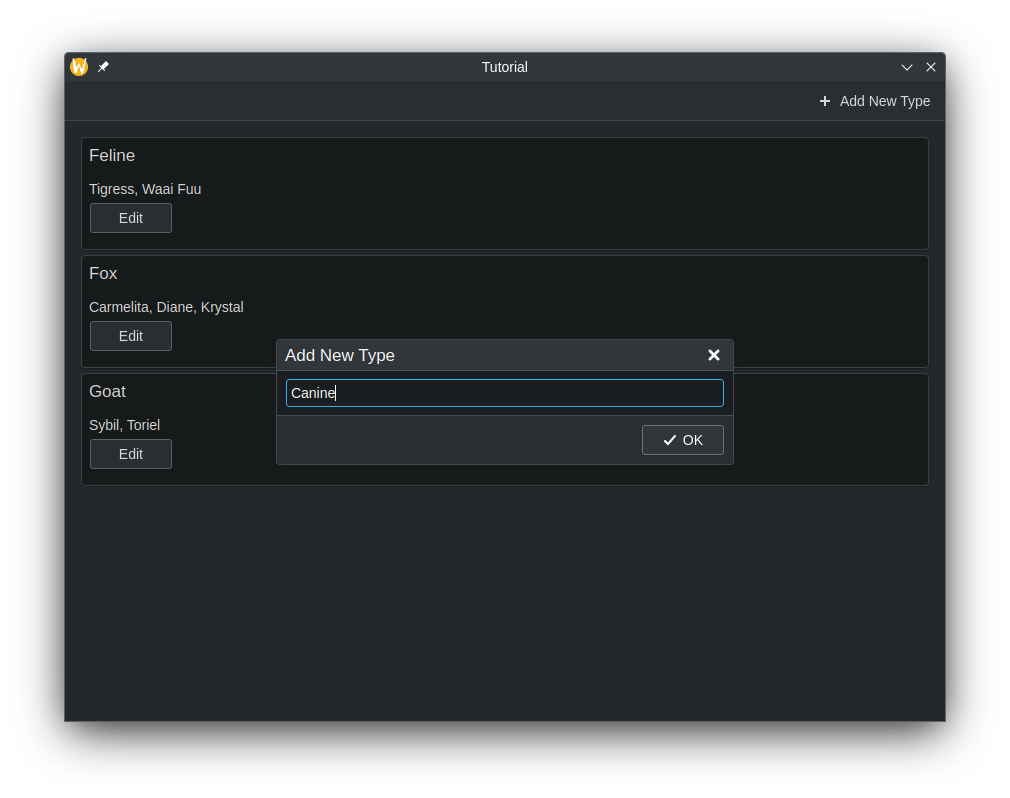
الآن، يجب أن يُمنحنا إجراء جديد في أعلى التطبيق يعرض موجهًا يسمح بإضافة عنصر جديد إلى النموذج، مع بياناتنا المخصصة.

app_screenshot_add_1.png
app_screenshot_add_2.png

إزالة الصفوف

طريقة إزالة الصفوف مشابهة لإضافة الصفوف. لننشئ طريقة أخرى سنستدعيها في QML. هذه المرة، سنستخدم معاملًا إضافيًا، وهو عدد صحيح يمثل رقم الصف. يُستخدم اسم النوع لحذف المفتاح من QMap، بينما يُستخدم رقم الصف لحذف الصف في الواجهة الأمامية.

أضف دالة Q_INVOKABLE جديدة باسم deleteSpecies() في src/components/model.h:

 1
 2
 3
 4
 5
 6
 7
 8
 9
10
11
12
13
14
15
16
17
18
19
20
21
22
23
24
25
26
27
#pragma once

#include <QAbstractListModel>
#include <qqmlintegration.h>

class Model : public QAbstractListModel {
    Q_OBJECT
    QML_ELEMENT
public:
    enum Roles {
        SpeciesRole = Qt::UserRole,
        CharactersRole
    };
    int rowCount(const QModelIndex &) const override;
    QHash<int, QByteArray> roleNames() const override;
    QVariant data(const QModelIndex &index, int role) const override;
    Q_INVOKABLE void addSpecies(const QString &species);
    Q_INVOKABLE void deleteSpecies(const QString &speciesName, const int &rowIndex);

private:
    QMap<QString, QStringList> m_list = {
        {"Feline", {"Tigress",   "Waai Fuu"}},
        {"Fox",    {"Carmelita", "Diane", "Krystal"}},
        {"Goat",   {"Sybil",     "Toriel"}}
    };
    static QString formatList(const QStringList& list);
};

مع تطبيق مطابق في src/components/model.cpp:

 1
 2
 3
 4
 5
 6
 7
 8
 9
10
11
12
13
14
15
16
17
18
19
20
21
22
23
24
25
26
27
28
29
30
31
32
33
34
35
36
37
38
39
40
41
42
43
44
45
46
47
48
49
50
51
52
53
54
55
56
57
58
59
60
61
62
63
64
#include "model.h"

int Model::rowCount(const QModelIndex &) const {
    return m_list.count();
}

QHash<int, QByteArray> Model::roleNames() const {
    return {
        {SpeciesRole,   "species"},
        {CharactersRole, "characters"}
    };
}

QVariant Model::data(const QModelIndex &index, int role) const {
    const auto it = std::next(m_list.begin(), index.row());
    switch (role) {
        case SpeciesRole:
            return it.key();
        case CharactersRole:
            return formatList(it.value());
        default:
            return {};
    }
}

QString Model::formatList(const QStringList& list) {
    QString result;
    for (const QString& character : list) {
        result += character;
        if (list.last() != character) {
            result += ", ";
        }
    }
    return result;
}

bool Model::setData(const QModelIndex &index, const QVariant &value, int role) {
    if (!value.canConvert<QString>() && role != Qt::EditRole) {
        return false;
    }

    auto it = std::next(m_list.begin(), index.row());
    QString charactersUnformatted = value.toString();
    QStringList characters = charactersUnformatted.split(", ");

    m_list[it.key()] = characters;
    Q_EMIT dataChanged(index, index);

    return true;
}

void Model::addSpecies(const QString& species) {
    beginInsertRows(QModelIndex(), m_list.size() - 1, m_list.size() - 1);
    m_list.insert(species, {});
    endInsertRows();
    Q_EMIT dataChanged(index(0), index(m_list.size() - 1));
}

void Model::deleteSpecies(const QString &speciesName, const int& rowIndex) {
    beginRemoveRows(QModelIndex(), rowIndex, rowIndex);
    m_list.remove(speciesName);
    endRemoveRows();
    Q_EMIT dataChanged(index(0), index(m_list.size() - 1));
}

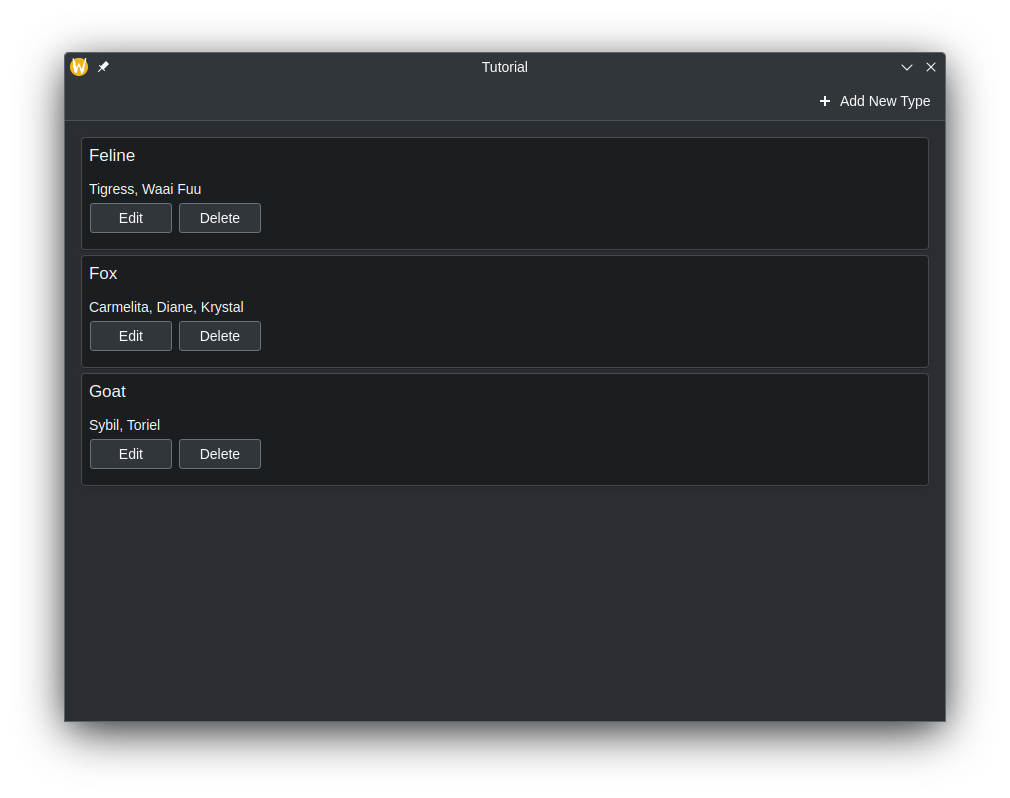
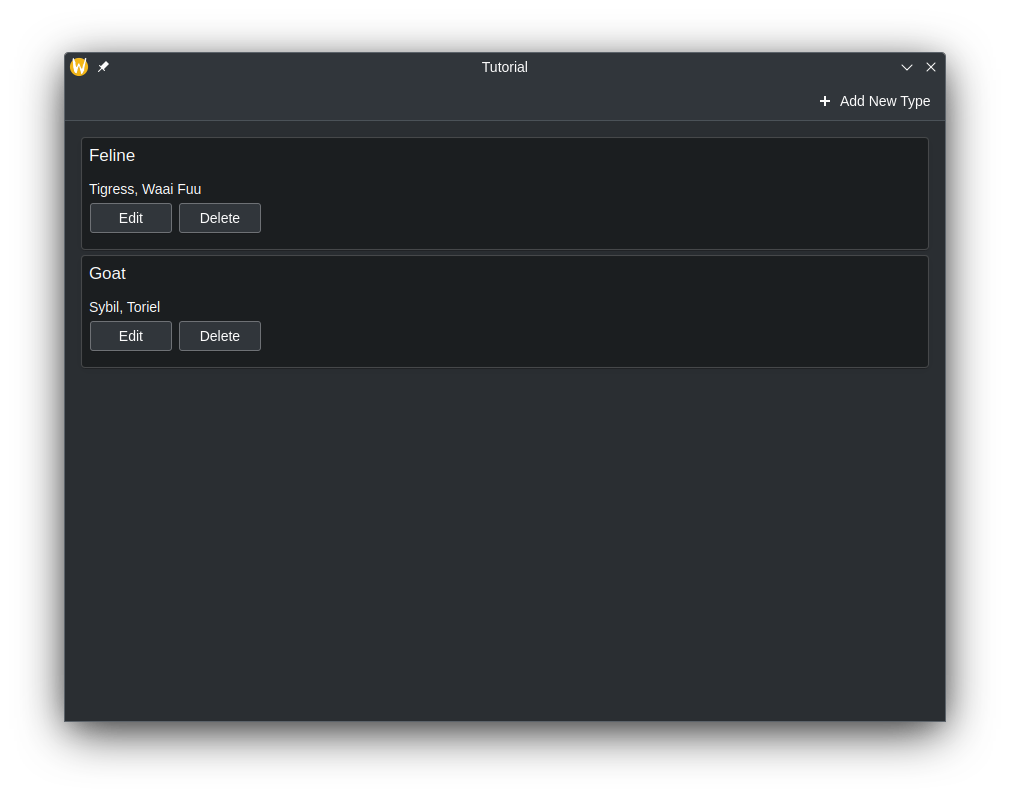
الآن، لنقم بتحديث التطبيق ليظهر زر "حذف" في RowLayout بجانب زر التحرير داخل AbstractCard، وربطه بطريقة الحذف لدينا.

24
25
26
27
28
29
30
31
32
33
34
35
36
37
38
39
40
41
42
43
44
45
46
47
48
49
50
51
52
53
54
55
56
57
58
59
60
        Repeater {
            model: customModel
            delegate: Kirigami.AbstractCard {
                Layout.fillHeight: true
                header: Kirigami.Heading {
                    text: model.species
                    level: 2
                }
                contentItem: Item {
                    implicitWidth: delegateLayout.implicitWidth
                    implicitHeight: delegateLayout.implicitHeight
                    ColumnLayout {
                        id: delegateLayout
                        Controls.Label {
                            text: model.characters
                        }
                        RowLayout {
                            Layout.fillWidth: true
                            Controls.Button {
                                text: "Edit"
                                onClicked: {
                                    editPrompt.text = model.characters;
                                    editPrompt.model = model;
                                    editPrompt.open();
                                }
                            }
                            Controls.Button {
                                text: "Delete"
                                onClicked: {
                                    customModel.deleteSpecies(model.species, index);
                                }
                            }
                        }
                    }
                }
            }
        }
app_screenshot_del_1.png
app_screenshot_del_2.png

تطبيقنا حتى الآن

الكود الموجود:

src/CMakeLists.txt
 1
 2
 3
 4
 5
 6
 7
 8
 9
10
11
12
13
14
15
16
17
18
19
20
21
22
23
24
25
26
27
28
29
30
31
32
33
add_executable(kirigami-hello)

ecm_add_qml_module(kirigami-hello
    URI
    org.kde.tutorial
)

target_sources(kirigami-hello
    PRIVATE
    main.cpp
)

ecm_target_qml_sources(kirigami-hello
    SOURCES
    Main.qml
)

target_link_libraries(kirigami-hello
    PRIVATE
    Qt6::Quick
    Qt6::Qml
    Qt6::Gui
    Qt6::QuickControls2
    Qt6::Widgets
    KF6::I18n
    KF6::CoreAddons
    KF6::IconThemes
    kirigami-hello-components
)

install(TARGETS kirigami-hello ${KDE_INSTALL_TARGETS_DEFAULT_ARGS})

add_subdirectory(components)
src/main.cpp
 1
 2
 3
 4
 5
 6
 7
 8
 9
10
11
12
13
14
15
16
17
18
19
20
21
22
23
24
25
26
27
28
29
30
31
32
33
34
35
#include <QApplication>
#include <QQmlApplicationEngine>
#include <QtQml>
#include <QUrl>
#include <QQuickStyle>
#include <KLocalizedContext>
#include <KLocalizedString>
#include <KIconTheme>

int main(int argc, char *argv[])
{
    KIconTheme::initTheme();
    QApplication app(argc, argv);
    KLocalizedString::setApplicationDomain("tutorial");
    QApplication::setOrganizationName(QStringLiteral("KDE"));
    QApplication::setOrganizationDomain(QStringLiteral("kde.org"));
    QApplication::setApplicationName(QStringLiteral("Kirigami Tutorial"));
    QApplication::setDesktopFileName(QStringLiteral("org.kde.tutorial"));

    QApplication::setStyle(QStringLiteral("breeze"));
    if (qEnvironmentVariableIsEmpty("QT_QUICK_CONTROLS_STYLE")) {
        QQuickStyle::setStyle(QStringLiteral("org.kde.desktop"));
    }

    QQmlApplicationEngine engine;

    engine.rootContext()->setContextObject(new KLocalizedContext(&engine));
    engine.loadFromModule("org.kde.tutorial", "Main");

    if (engine.rootObjects().isEmpty()) {
        return -1;
    }

    return app.exec();
}
src/components/KountdownDelegate.qml
 1
 2
 3
 4
 5
 6
 7
 8
 9
10
11
12
13
14
15
16
17
18
19
20
21
22
23
24
25
26
27
28
29
30
31
32
33
34
35
36
37
38
39
40
41
42
43
44
45
46
47
48
49
50
import QtQuick
import QtQuick.Layouts
import QtQuick.Controls as Controls
import org.kde.kirigami as Kirigami

Kirigami.AbstractCard {
    contentItem: Item {
        implicitWidth: delegateLayout.implicitWidth
        implicitHeight: delegateLayout.implicitHeight
        GridLayout {
            id: delegateLayout
            anchors {
                left: parent.left
                top: parent.top
                right: parent.right
            }
            rowSpacing: Kirigami.Units.largeSpacing
            columnSpacing: Kirigami.Units.largeSpacing
            columns: root.wideScreen ? 4 : 2

            Kirigami.Heading {
                level: 1
                text: i18n("%1 days", Math.round((date-Date.now())/86400000))
            }

            ColumnLayout {
                Kirigami.Heading {
                    Layout.fillWidth: true
                    level: 2
                    text: name
                }
                Kirigami.Separator {
                    Layout.fillWidth: true
                    visible: description.length > 0
                }
                Controls.Label {
                    Layout.fillWidth: true
                    wrapMode: Text.WordWrap
                    text: description
                    visible: description.length > 0
                }
            }
            Controls.Button {
                Layout.alignment: Qt.AlignRight
                Layout.columnSpan: 2
                text: i18n("Edit")
            }
        }
    }
}
src/components/AddDialog.qml
 1
 2
 3
 4
 5
 6
 7
 8
 9
10
11
12
13
14
15
16
17
18
19
20
21
22
23
24
25
26
27
28
29
30
31
32
33
34
35
36
37
38
39
40
41
42
43
44
45
46
47
48
49
50
51
52
53
54
55
56
57
58
59
import QtQuick
import QtQuick.Layouts
import QtQuick.Controls as Controls
import org.kde.kirigami as Kirigami

Kirigami.Dialog {
    id: addDialog
    title: i18nc("@title:window", "Add kountdown")
    standardButtons: Kirigami.Dialog.Ok | Kirigami.Dialog.Cancel
    padding: Kirigami.Units.largeSpacing
    preferredWidth: Kirigami.Units.gridUnit * 20

    Kirigami.FormLayout {
        Controls.TextField {
            id: nameField
            Kirigami.FormData.label: i18nc("@label:textbox", "Name*:")
            onAccepted: descriptionField.forceActiveFocus()
        }
        Controls.TextField {
            id: descriptionField
            Kirigami.FormData.label: i18nc("@label:textbox", "Description:")
            onAccepted: dateField.forceActiveFocus()
        }
        Controls.TextField {
            id: dateField
            Kirigami.FormData.label: i18nc("@label:textbox", "ISO Date*:")
            inputMask: "D999-99-99"
            onAccepted: addDialog.accepted()
        }
        Controls.Label {
            text: "* = required fields"
        }
    }
    Component.onCompleted: {
        const button = standardButton(Kirigami.Dialog.Ok);
        button.enabled = Qt.binding( () => requiredFieldsFilled() );
    }
    onAccepted: {
        if (!addDialog.requiredFieldsFilled()) return;
        appendDataToModel();
        clearFieldsAndClose();
    }
    function requiredFieldsFilled() {
        return (nameField.text !== "" && dateField.acceptableInput);
    }
    function appendDataToModel() {
        kountdownModel.append({
            name: nameField.text,
            description: descriptionField.text,
            date: new Date(dateField.text)
        });
    }
    function clearFieldsAndClose() {
        nameField.text = ""
        descriptionField.text = ""
        dateField.text = ""
        addDialog.close();
    }
}
src/components/ExposePage.qml
 1
 2
 3
 4
 5
 6
 7
 8
 9
10
import org.kde.kirigami as Kirigami
import org.kde.tutorial.components

Kirigami.Page {
    title: "Exposing to QML Tutorial"
    Kirigami.Heading {
        anchors.centerIn: parent
        text: Backend.introductionText
    }
}
src/components/backend.h
 1
 2
 3
 4
 5
 6
 7
 8
 9
10
11
12
13
14
15
16
17
18
19
#pragma once

#include <QObject>
#include <qqmlintegration.h>

class Backend : public QObject
{
    Q_OBJECT
    QML_ELEMENT
    QML_SINGLETON
    Q_PROPERTY(QString introductionText READ introductionText WRITE setIntroductionText NOTIFY introductionTextChanged)
public:
    explicit Backend(QObject *parent = nullptr);
    QString introductionText() const;
    void setIntroductionText(const QString &introductionText);
    Q_SIGNAL void introductionTextChanged();
private:
    QString m_introductionText = QStringLiteral("Hello World!");
};
src/components/backend.cpp
 1
 2
 3
 4
 5
 6
 7
 8
 9
10
11
12
13
14
15
16
#include "backend.h"

Backend::Backend(QObject *parent)
    : QObject(parent)
{}

QString Backend::introductionText() const
{
    return m_introductionText;
}

void Backend::setIntroductionText(const QString &introductionText)
{
    m_introductionText = introductionText;
    Q_EMIT introductionTextChanged();
}

الكود المكتوب/المعدل في هذه الصفحة:

CMakeLists.txt
 1
 2
 3
 4
 5
 6
 7
 8
 9
10
11
12
13
14
15
16
17
18
19
20
21
22
23
24
25
26
27
28
29
30
31
32
33
34
35
36
37
cmake_minimum_required(VERSION 3.20)
project(kirigami-tutorial)

find_package(ECM 6.0.0 REQUIRED NO_MODULE)
set(CMAKE_MODULE_PATH ${ECM_MODULE_PATH})

include(KDEInstallDirs)
include(KDECMakeSettings)
include(KDECompilerSettings NO_POLICY_SCOPE)
include(ECMFindQmlModule)
include(ECMQmlModule)
remove_definitions(-DQT_NO_CAST_FROM_ASCII)

find_package(Qt6 REQUIRED COMPONENTS
    Core
    Quick
    Test
    Gui
    QuickControls2
    Widgets
)

find_package(KF6 REQUIRED COMPONENTS
    Kirigami
    I18n
    CoreAddons
    QQC2DesktopStyle
    IconThemes
)

ecm_find_qmlmodule(org.kde.kirigami REQUIRED)

add_subdirectory(src)

install(PROGRAMS org.kde.tutorial.desktop DESTINATION ${KDE_INSTALL_APPDIR})

feature_summary(WHAT ALL INCLUDE_QUIET_PACKAGES FATAL_ON_MISSING_REQUIRED_PACKAGES)
src/Main.qml
 1
 2
 3
 4
 5
 6
 7
 8
 9
10
11
12
13
14
15
16
17
18
19
20
21
22
23
24
25
26
27
28
29
30
31
32
33
34
35
36
37
38
39
40
41
42
43
44
45
46
47
48
49
50
51
52
53
54
55
56
57
58
59
60
61
62
63
import QtQuick
import QtQuick.Layouts
import QtQuick.Controls as Controls
import org.kde.kirigami as Kirigami
import org.kde.tutorial.components

Kirigami.ApplicationWindow {
    id: root

    width: 600
    height: 400

    title: i18nc("@title:window", "Day Kountdown")

    globalDrawer: Kirigami.GlobalDrawer {
        isMenu: true
        actions: [
            Kirigami.Action {
                text: i18n("Exposing to QML Tutorial")
                icon.name: "kde"
                onTriggered: pageStack.push(Qt.createComponent("org.kde.tutorial.components", "ExposePage"))
            },
            Kirigami.Action {
                text: i18n("C++ models in QML tutorial")
                icon.name: "kde"
                onTriggered: pageStack.push(Qt.createComponent("org.kde.tutorial.components", "ModelsPage"))
            },
            Kirigami.Action {
                text: i18n("Quit")
                icon.name: "application-exit-symbolic"
                shortcut: StandardKey.Quit
                onTriggered: Qt.quit()
            }
        ]
    }

    ListModel {
        id: kountdownModel
    }

    AddDialog {
        id: addDialog
    }

    pageStack.initialPage: Kirigami.ScrollablePage {
        title: i18nc("@title", "Kountdown")

        actions: [
            Kirigami.Action {
                id: addAction
                icon.name: "list-add-symbolic"
                text: i18nc("@action:button", "Add kountdown")
                onTriggered: addDialog.open()
            }
        ]

        Kirigami.CardsListView {
            id: cardsView
            model: kountdownModel
            delegate: KountdownDelegate {}
        }
    }
}
src/components/CMakeLists.txt
 1
 2
 3
 4
 5
 6
 7
 8
 9
10
11
12
13
14
15
16
17
18
19
20
21
22
23
24
add_library(kirigami-hello-components)

ecm_add_qml_module(kirigami-hello-components
    URI "org.kde.tutorial.components"
    GENERATE_PLUGIN_SOURCE
)

ecm_target_qml_sources(kirigami-hello-components
    SOURCES
    AddDialog.qml
    KountdownDelegate.qml
    ExposePage.qml
    ModelsPage.qml
)

target_sources(kirigami-hello-components
    PRIVATE
    backend.cpp backend.h
    model.cpp model.h
)

ecm_finalize_qml_module(kirigami-hello-components)

install(TARGETS kirigami-hello-components ${KDE_INSTALL_TARGETS_DEFAULT_ARGS})
src/components/ModelsPage.qml
 1
 2
 3
 4
 5
 6
 7
 8
 9
10
11
12
13
14
15
16
17
18
19
20
21
22
23
24
25
26
27
28
29
30
31
32
33
34
35
36
37
38
39
40
41
42
43
44
45
46
47
48
49
50
51
52
53
54
55
56
57
58
59
60
61
62
63
64
65
66
67
68
69
70
71
72
73
74
75
76
77
78
79
80
81
82
83
84
85
86
87
88
89
90
91
92
93
94
import QtQuick
import QtQuick.Layouts
import QtQuick.Controls as Controls
import org.kde.kirigami as Kirigami
import org.kde.tutorial.components

Kirigami.ScrollablePage {
    title: "C++ models in QML"
    actions: [
        Kirigami.Action {
            icon.name: "list-add-symbolic"
            text: "Add New Species"
            onTriggered: {
                addPrompt.open();
            }
        }
    ]
    Model {
        id: customModel
    }
    ColumnLayout {
        anchors.left: parent.left
        anchors.right: parent.right
        Repeater {
            model: customModel
            delegate: Kirigami.AbstractCard {
                Layout.fillHeight: true
                header: Kirigami.Heading {
                    text: model.species
                    level: 2
                }
                contentItem: Item {
                    implicitWidth: delegateLayout.implicitWidth
                    implicitHeight: delegateLayout.implicitHeight
                    ColumnLayout {
                        id: delegateLayout
                        Controls.Label {
                            text: model.characters
                        }
                        RowLayout {
                            Layout.fillWidth: true
                            Controls.Button {
                                text: "Edit"
                                onClicked: {
                                    editPrompt.text = model.characters;
                                    editPrompt.model = model;
                                    editPrompt.open();
                                }
                            }
                            Controls.Button {
                                text: "Delete"
                                onClicked: {
                                    customModel.deleteSpecies(model.species, index);
                                }
                            }
                        }
                    }
                }
            }
        }
    }
    Kirigami.PromptDialog {
        id: addPrompt
        title: "Add New Species"
        standardButtons: Kirigami.Dialog.Ok
        onAccepted: {
            customModel.addSpecies(addPromptText.text);
            addPromptText.text = ""; // Clear TextField every time it's done
            addPrompt.close();
        }
        Controls.TextField {
            id: addPromptText
            Layout.fillWidth: true
            onAccepted: addPrompt.accept()
        }
    }

    Kirigami.PromptDialog {
        id: editPrompt
        property var model
        property alias text: editPromptText.text
        title: "Edit Characters"
        standardButtons: Kirigami.Dialog.Ok | Kirigami.Dialog.Cancel
        onAccepted: {
            const model = editPrompt.model;
            model.characters = editPromptText.text;
            editPrompt.close();
        }
        Controls.TextField {
            id: editPromptText
            onAccepted: editPrompt.accept()
        }
    }
}
src/components/model.h
 1
 2
 3
 4
 5
 6
 7
 8
 9
10
11
12
13
14
15
16
17
18
19
20
21
22
23
24
25
26
27
#pragma once

#include <QAbstractListModel>
#include <qqmlintegration.h>

class Model : public QAbstractListModel {
    Q_OBJECT
    QML_ELEMENT
public:
    enum Roles {
        SpeciesRole = Qt::UserRole,
        CharactersRole
    };
    int rowCount(const QModelIndex &) const override;
    QHash<int, QByteArray> roleNames() const override;
    QVariant data(const QModelIndex &index, int role) const override;
    bool setData(const QModelIndex &index, const QVariant &value, int role) override;
    Q_INVOKABLE void addSpecies(const QString &species);
    Q_INVOKABLE void deleteSpecies(const QString &speciesName, const int &rowIndex);
private:
    QMap<QString, QStringList> m_list = {
        {"Feline", {"Tigress",   "Waai Fuu"}},
        {"Fox",    {"Carmelita", "Diane", "Krystal"}},
        {"Goat",   {"Sybil",     "Toriel"}}
    };
    static QString formatList(const QStringList& list);
};
src/components/model.cpp
 1
 2
 3
 4
 5
 6
 7
 8
 9
10
11
12
13
14
15
16
17
18
19
20
21
22
23
24
25
26
27
28
29
30
31
32
33
34
35
36
37
38
39
40
41
42
43
44
45
46
47
48
49
50
51
52
53
54
55
56
57
58
59
60
61
62
63
64
#include "model.h"

int Model::rowCount(const QModelIndex &) const {
    return m_list.count();
}

QHash<int, QByteArray> Model::roleNames() const {
    return {
        {SpeciesRole,   "species"},
        {CharactersRole, "characters"}
    };
}

QVariant Model::data(const QModelIndex &index, int role) const {
    const auto it = std::next(m_list.begin(), index.row());
    switch (role) {
        case SpeciesRole:
            return it.key();
        case CharactersRole:
            return formatList(it.value());
        default:
            return {};
    }
}

QString Model::formatList(const QStringList& list) {
    QString result;
    for (const QString& character : list) {
        result += character;
        if (list.last() != character) {
            result += ", ";
        }
    }
    return result;
}

bool Model::setData(const QModelIndex &index, const QVariant &value, int role) {
    if (!value.canConvert<QString>() && role != Qt::EditRole) {
        return false;
    }

    auto it = std::next(m_list.begin(), index.row());
    QString charactersUnformatted = value.toString();
    QStringList characters = charactersUnformatted.split(", ");

    m_list[it.key()] = characters;
    Q_EMIT dataChanged(index, index);

    return true;
}

void Model::addSpecies(const QString& species) {
    beginInsertRows(QModelIndex(), m_list.size() - 1, m_list.size() - 1);
    m_list.insert(species, {});
    endInsertRows();
    Q_EMIT dataChanged(index(0), index(m_list.size() - 1));
}

void Model::deleteSpecies(const QString &speciesName, const int& rowIndex) {
    beginRemoveRows(QModelIndex(), rowIndex, rowIndex);
    m_list.remove(speciesName);
    endRemoveRows();
    Q_EMIT dataChanged(index(0), index(m_list.size() - 1));
}

مزيد من المعلومات

لمزيد من المعلومات، انظر استخدام نماذج C++ مع عروض Qt Quick و برمجة النموذج/العرض.