#include<QApplication>#include<QQmlApplicationEngine>#include<QtQml>#include<QUrl>#include<KAboutData>#include<KLocalizedContext>#include<KLocalizedString>intmain(intargc,char*argv[]){QCoreApplication::setAttribute(Qt::AA_EnableHighDpiScaling);QApplicationapp(argc,argv);KLocalizedString::setApplicationDomain("helloworld");QCoreApplication::setOrganizationName(QStringLiteral("KDE"));QCoreApplication::setOrganizationDomain(QStringLiteral("kde.org"));QCoreApplication::setApplicationName(QStringLiteral("Hello World"));if(qEnvironmentVariableIsEmpty("QT_QUICK_CONTROLS_STYLE")){QQuickStyle::setStyle(QStringLiteral("org.kde.desktop"));}KAboutDataaboutData(QStringLiteral("helloworld"),i18nc("@title","Hello World"),QStringLiteral("1.0"),i18n("Hello world application"),KAboutLicense::GPL,i18n("(c) 2021"));aboutData.addAuthor(i18nc("@info:credit","Your name"),i18nc("@info:credit","Author Role"),QStringLiteral("your@email.com"),QStringLiteral("https://yourwebsite.com"));// Set aboutData as information about the app
KAboutData::setApplicationData(aboutData);// Register a singleton that will be accessible from QML.
qmlRegisterSingletonType("org.kde.example",// How the import statement should look like
1,0,// Major and minor versions of the import
"About",// The name of the QML object
[](QQmlEngine*engine,QJSEngine*)->QJSValue{// Here we retrieve our aboutData and give it to the QML engine
// to turn it into a QML type
returnengine->toScriptValue(KAboutData::applicationData());});// Load an application from a QML file
QQmlApplicationEngineengine;engine.rootContext()->setContextObject(newKLocalizedContext(&engine));engine.load(QUrl(QStringLiteral("qrc:/main.qml")));if(engine.rootObjects().isEmpty()){return-1;}returnapp.exec();}
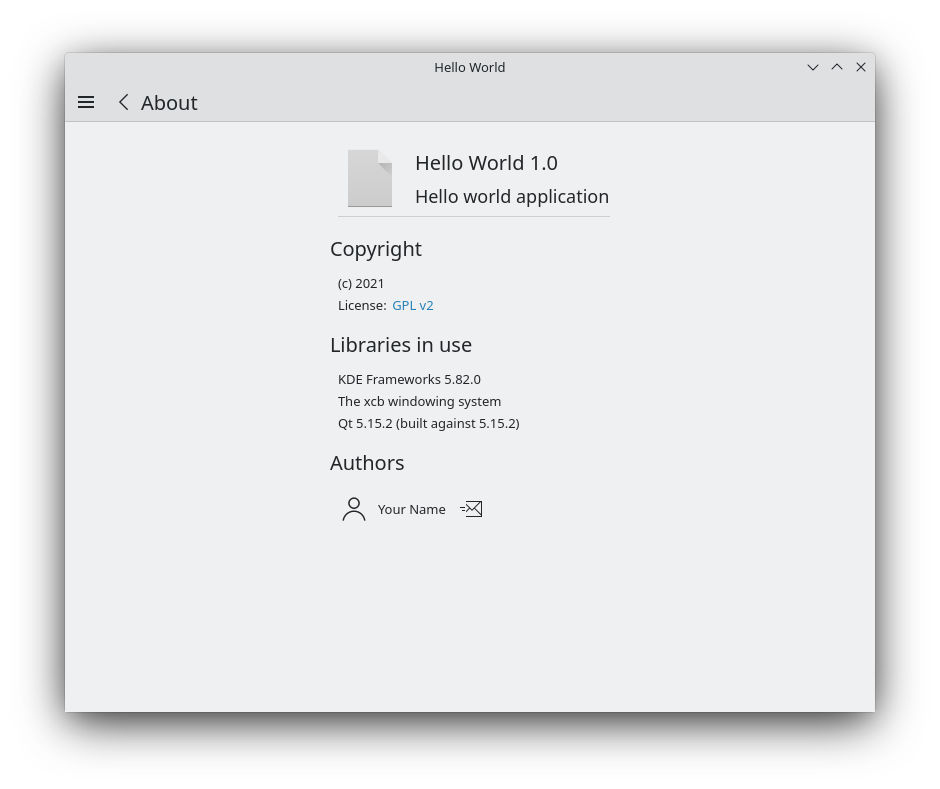
في ملف main.cpp نضمّن KAboutData، وهو مكون أساسي من أطر عمل كيدي يتيح لنا تخزين معلومات عن تطبيقنا. يمكن بعد ذلك إعادة استخدام هذه المعلومات بواسطة العديد من مكونات أطر عمل كيدي الأخرى. ننشئ كائن aboutData جديدًا بمنشئه المبدئي الكامل إلى حد ما ونضيف معلومات المؤلف.
ثم ننشئ qmlRegisterSingletonType(). يُستخدم هذا للسماح لنا باستيراد شيفرة C++ كوحدة في main.qml باستخدام import org.kde.example 1.0.
وسيطته الأولى هي URI التي ستُستخدم للاستيراد، والوسيطتان الثانية والثالثة هما الإصداران الرئيسي والثانوي على التوالي، والرابعة هي اسم النوع، الاسم الذي سنستدعيه عند الوصول إلى نوع About، والأخيرة هي مرجع إلى كائن C++ المُعرَّض لـ QML. في حالة الأخير، نستخدم لامدا لإنشاء aboutData لتطبيقنا في مكانه.
importQtQuickimportQtQuick.LayoutsimportQtQuick.ControlsasControlsimportorg.kde.kirigamiasKirigamiimportorg.kde.example1.0Kirigami.ApplicationWindow{id: roottitle:i18nc("@title:window","Day Kountdown")globalDrawer:Kirigami.GlobalDrawer{isMenu:trueactions:[Kirigami.Action{text:i18n("Quit")icon.name:"gtk-quit"shortcut:StandardKey.QuitonTriggered:Qt.quit()},Kirigami.Action{// <==== Action to open About page
text:i18n("About")icon.name:"help-about"onTriggered:pageStack.layers.push(aboutPage)}]}Component{// <==== Component that instantiates the Kirigami.AboutPage
id: aboutPageKirigami.AboutPage{aboutData:About}}ListModel{id: kountdownModel}AddEditSheet{id: addEditSheetonAdded:kountdownModel.append({"name":name,"description":description,"date":Date.parse(kdate)});onEdited:kountdownModel.set(index,{"name":name,"description":description,"date":Date.parse(kdate)});onRemoved:kountdownModel.remove(index,1)}functionopenPopulatedSheet(mode,index=-1,listName="",listDesc="",listDate=""){addEditSheet.mode=modeaddEditSheet.index=index;addEditSheet.name=listNameaddEditSheet.description=listDescaddEditSheet.kdate=listDateaddEditSheet.open()}pageStack.initialPage:Kirigami.ScrollablePage{title:i18nc("@title","Kountdown")actions:[Kirigami.Action{id: addActionicon.name:"list-add"text:i18nc("@action:button","Add kountdown")onTriggered:openPopulatedSheet("add")}]Kirigami.CardsListView{id: layoutmodel:kountdownModeldelegate:KountdownDelegate{}}}}
أولًا، نستخدم الاستيراد الذي عرّفناه في ملف main.cpp، أي org.kde.example. ثم نضيف Kirigami.Action إلى الدرج العام الذي سيرسلنا إلى صفحة حول، وننشئ مكونًا يحتوي على Kirigami.AboutPage فيه، والذي يتوقع كائن KAboutData::applicationData(). لقد عرضنا ذلك بالضبط في main.cpp وأسميناه About، لذا يمكننا تمريره هنا.